Turn your most passionate members into a growth engine with Community Affiliates. This guide explains how the program works, who’s eligible, and how you can access your affiliate tools. You’ll learn how to set the commission %, track referrals, access your dashboard, and manage payouts.
TABLE OF CONTENTS
- What is community affiliates?
- How to set up your commission %
- Your dashboard
- Updating payout status
- Downloading bank details
- Frequently asked questions (FAQs)
What is community affiliates?
Community Affiliates is a built-in referral program that lets your community members earn commissions for inviting others to join your paid community.
When an invitee joins and pays, the referrer earns a commission that you control.
1. How to set up your commission %
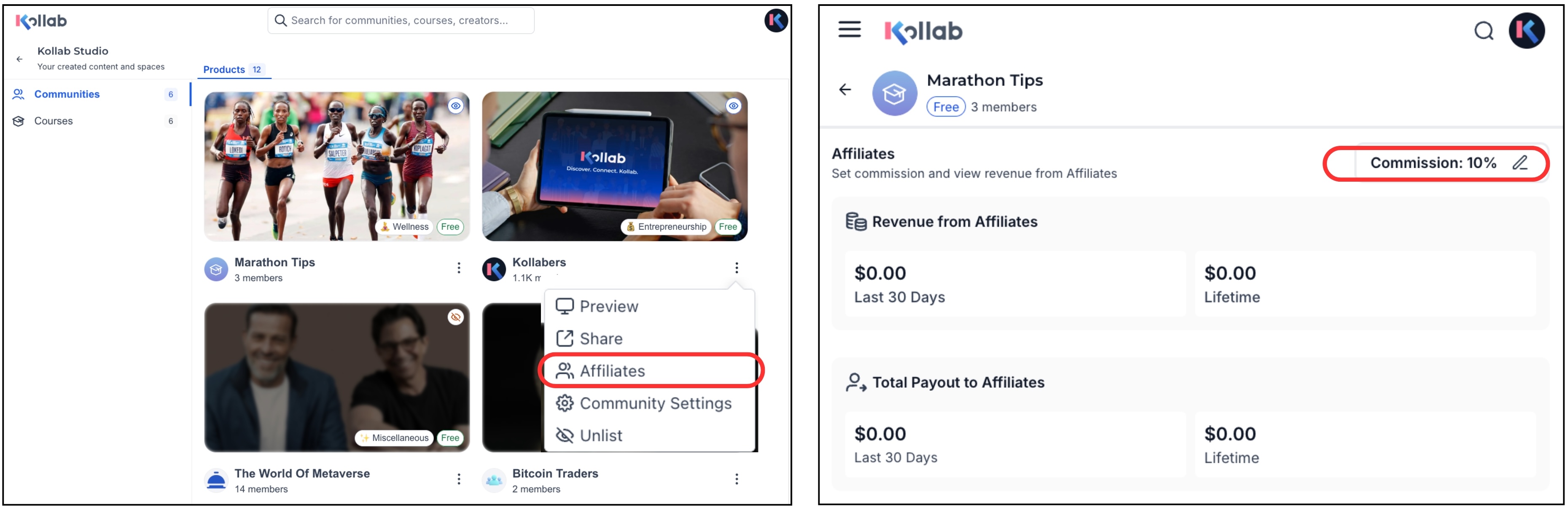
Open Kollab Studio.
Click the kebab menu (⋮) next to your community name.
Click Affiliates.
In the top-right corner, enter your Commission %.
Click Update Commission.
Once you set a commission, all existing members automatically receive invite links.
2. Your dashboard
Key metrics
Revenue from Affiliates
The total membership revenue generated through referral invites.Total Payouts to Affiliates
How much you’ve already paid to the members for successful referrals.
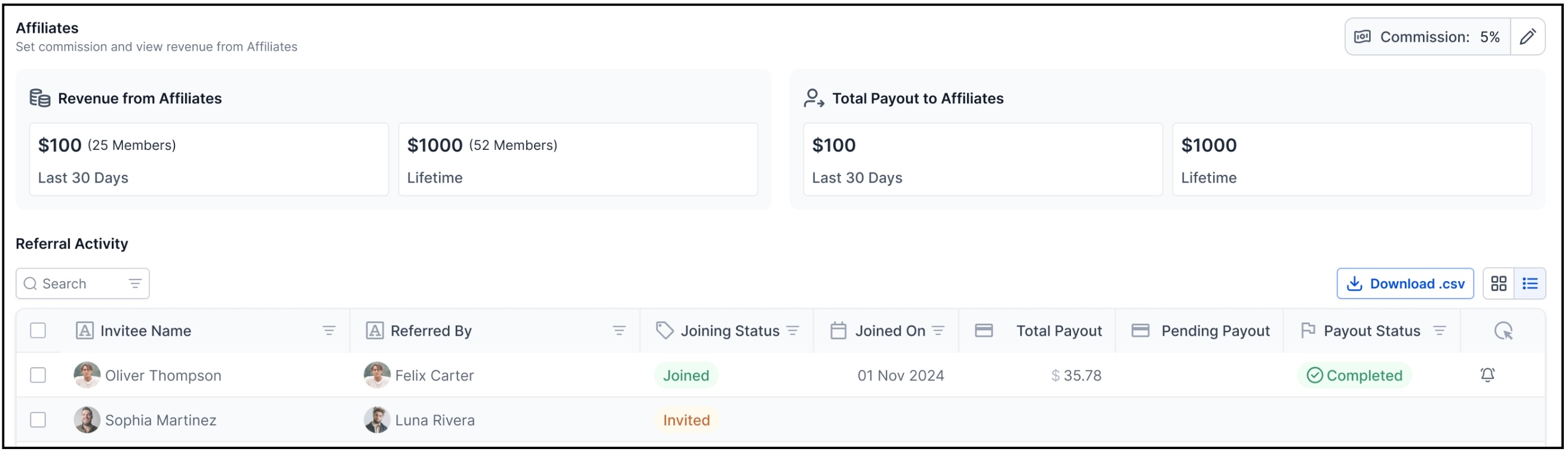
Referral Activity table — What everything means
| Field | Description |
|---|---|
| Invitee Name | The new member invited by the affiliate. |
| Referred By | The affiliate who shared the invite link. |
| Joining Status | Invited → invitee hasn’t paid yet. Joined → invitee paid and became a member. |
| Total Payouts | Total commission amount you’ve already paid for that referral. |
| Pending Payouts | Total commission amount you still owe for that referral. |
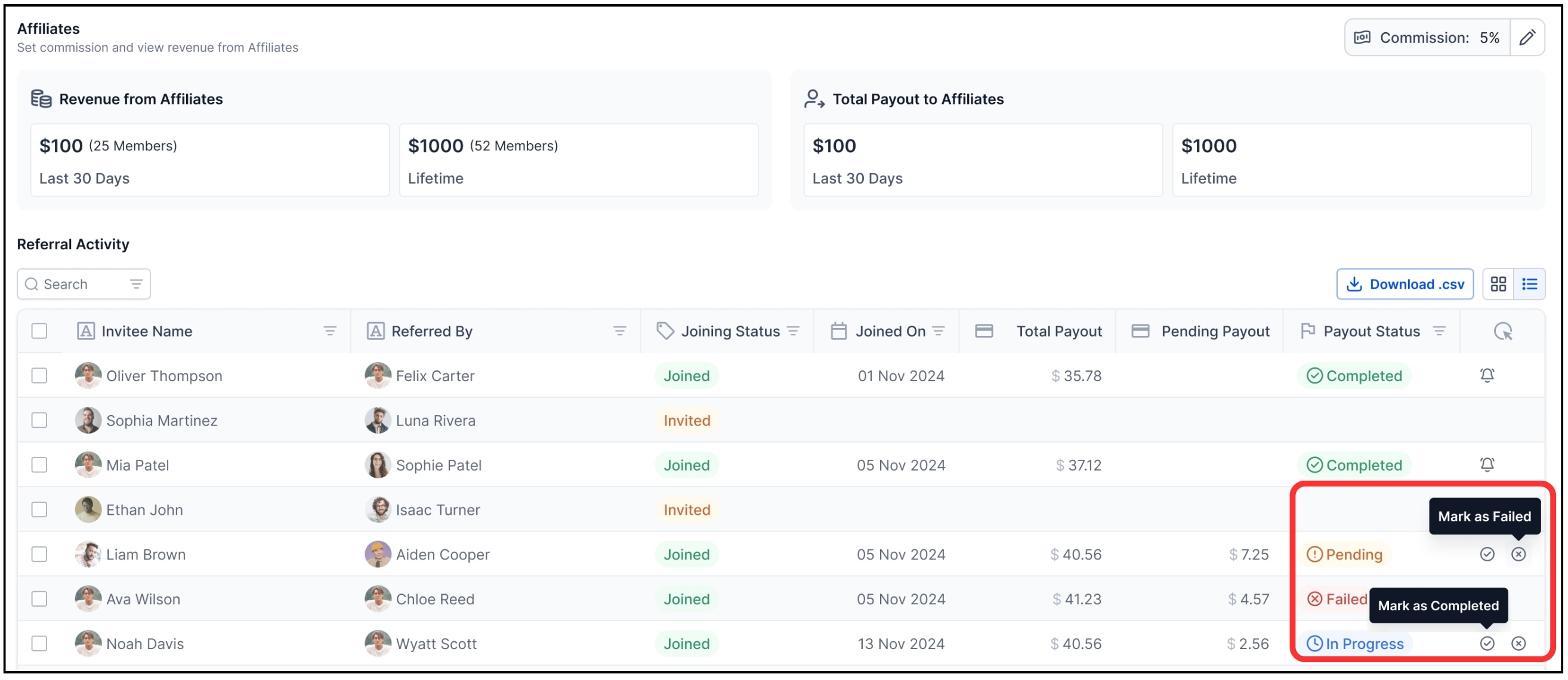
Payout status options
Completed → You have sent the payout.
Pending → Payout not yet processed.
Failed → Payment couldn’t be completed (e.g., wrong bank details).
3. Updating payout status
Inside the Referral Activity table:
Click ✓ to mark a payout as Completed.
Click ✕ to mark a payout as Failed.
Your updates instantly sync to the affiliate’s dashboard.
4. Downloading bank details
To retrieve bank details for payouts:
Go to the Referral Activity table.
Click Download CSV (top-right).
The file contains all required bank information for processing payments.
5. Frequently asked questions (FAQs)
Q. Who gets an invite link?
All members of your paid community (after you set a commission %).
Q. When is a commission created?
When someone joins and pays for the community using a affiliate's invite link.
Q. Who pays affiliates?
You (the Community Owner).
Kollab does not process payouts.
Q. Can affiliates see payout updates?
Yes, their dashboard will show Completed, Pending, or Failed.
Was this article helpful?
That’s Great!
Thank you for your feedback
Sorry! We couldn't be helpful
Thank you for your feedback
Feedback sent
We appreciate your effort and will try to fix the article